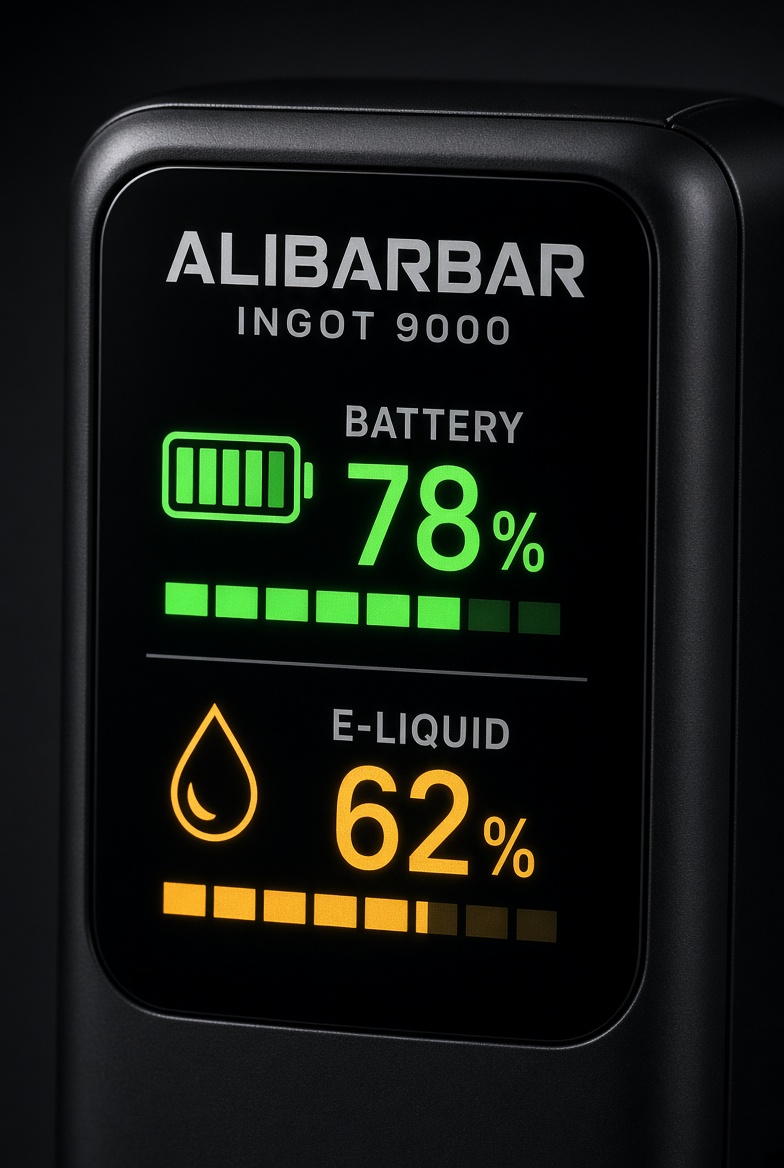
If you have recently upgraded to the Alibarbar Ingot 9000, you are holding one of the most advanced disposable vapes on the Australian market. Unlike older models where you had to guess when your juice was running low or when the battery was about to die, the Alibarbar Ingot 9000 LED display brings high-tech transparency to your vaping experience.
In this guide, we will break down exactly how to read the smart screen, what the indicators mean, and how to ensure you get all 9000 puffs out of your device.
Why the Alibarbar Ingot 9000 is a Game Changer
The Alibarbar Ingot 9000 has quickly become a fan favorite in Sydney, Melbourne, and Perth. The standout feature is undoubtedly the integrated LED smart screen. This feature solves the two biggest frustrations for vapers: the “burnt hit” from an empty tank and the “dead battery” when you’re out and about.
Understanding the Alibarbar Ingot 9000 LED Display
The display activates automatically whenever you take a puff. Here is how to interpret the data shown on the screen:
1. The E-Liquid Indicator (Droplet Icon)
The e-liquid level is usually represented by a droplet icon or a percentage scale.
- 100% – 50%: You have plenty of juice left. Enjoy the full-bodied flavor!
- 50% – 20%: You are past the halfway mark. It’s a good time to browse our Alibarbar Vape Collection to pick out your next flavor.
- Below 10%: The icon will often flash or turn red. This is your warning that the juice is almost depleted. Stop taking long “chain hits” to avoid burning the internal coil.
2. The Battery Life Indicator (Lightning Bolt/Percentage)
The battery level shows how much charge remains in the 650mAh rechargeable battery.
- Green/High Percentage: You are good to go for hours of vaping.
- Yellow/Medium Percentage: You might want to find your USB-C cable soon.
- Red/Low Percentage: The device needs a charge. The Alibarbar Ingot 9000 LED display will typically flash when the battery is too low to power the heating element.
How to Maintain Your Alibarbar Ingot 9000
To ensure the LED screen and the device function perfectly, follow these quick tips:
- Use the Right Charger: Always use a standard USB-C cable. Avoid “super-fast” phone chargers, as they can sometimes overwhelm the small batteries in disposable vapes.
- Don’t Overcharge: Once the LED display shows 100% or the light stops pulsing, unplug it.
- Keep it Upright: To keep the e-liquid sensor accurate, try to store your vape upright.
Why Buy From Alibarbar Vape AU?
When you shop at Alibarbar Vape AU, you aren’t just getting a device; you’re getting a guarantee of authenticity. The market is flooded with clones, but our Alibarbar Ingot 9000 units are 100% genuine, featuring the latest smart-chip technology for accurate LED readings.
- Fast Shipping: We ship across Australia, ensuring your vape reaches you in record time.
- Expert Support: Have questions? Contact us via WhatsApp at +61485889575 or Telegram @Contact_Alibarbar.
Final Thoughts
The Alibarbar Ingot 9000 LED display takes the guesswork out of vaping. By keeping an eye on your levels, you can ensure a smooth, flavorful experience from the first puff to the 9000th.
For more information on vaping safety and regulations in Australia, check out the Australian Government Department of Health website to stay informed.
Ready to try the Ingot 9000? Shop the full range of flavors here!